
Opralog · Operational registers

Operational registers
kept with the shift record.

Keep site-specific registers in the same system as your logbooks, instructions and handover.

Keep your registers in Opralog, set up the way your site uses them. We’ll agree with you what each one holds and who looks after it.

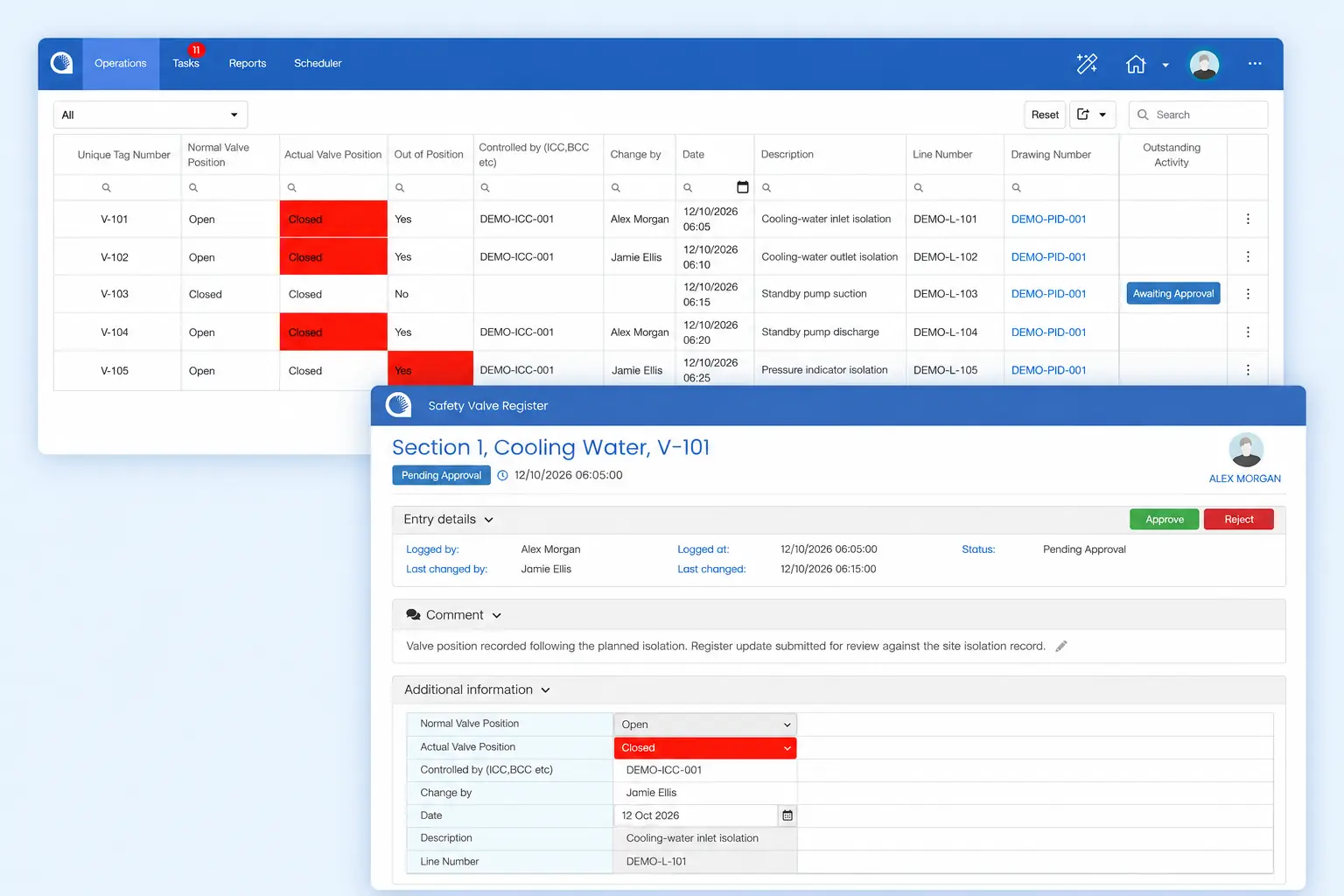
Opralog valve register alongside a record awaiting review.

01 / One record

Registers belong with the operational record

Many sites keep registers in separate spreadsheets, documents or paper files. The information may be accurate, but it sits apart from the events, instructions and open work that give it meaning.

In Opralog, registers are logbooks within the same system used for control-room logging and shift handover. Teams can see register information in the context of the shift.

Configure registers for locked-open and locked-closed valves, weeps and seeps, asbestos, personal isolations, overrides and long-term inhibits. Keep these records alongside operational logbooks and handovers.

02 / Configured per register

Configure each register around your process

Start with the register as your team uses it today: what is recorded, who updates it and who needs to review it. Relevant configuration can include:

  • Fields for the information each register needs to hold.
  • Conditional visibility to show the relevant parts of a form.
  • Limits, colour changes and pop-up warnings.
  • Scheduled or assigned entries and tasks.
  • Notifications or tasks triggered by a recorded condition.

The exact structure and behaviour of each register are agreed for your site.

Use registers in handover and review

Shift handover can include site-specific records maintained in register-type logbooks, so the incoming team sees them alongside events, instructions and outstanding work.

The operational history is searchable, so teams can return to earlier entries when preparing for a meeting or reviewing a recurring issue.

Explore shift handover software

03 / Getting started

Start with the registers you already keep

Bring one or two of your current registers to a demonstration, with the sensitive detail removed. Explain who updates them, how often, and what happens when an entry needs action.

We can then show how they could be configured in Opralog and how the information would appear to shift teams.

04 / A practical example

Follow one override from start to finish

01 / RECORD

Overrides register

Added

What, why and
who authorised it

02 / APPROVE

If switched on

Approval

The change is
approved before it stands

03 / EVERY SHIFT

Current items

Visible

On the list until
it’s removed

An operator puts an override in place and adds it to the overrides register, with what’s overridden, why and who authorised it.

If approval is switched on for that register, the change is approved before it stands. If it isn’t, it goes straight on the list.

Until the override is removed, it stays on the register’s list of current items, so every incoming shift can see it. When it’s removed, the audit trail keeps the record of who changed it and when.

How it works on your site depends on your configuration and operating procedures.

05 / Your questions

Questions about operational registers

Start with the basics. We can explore your particular registers in a demonstration.

Discuss your requirements ↗
01

What is an operational register?

An operational register is a list of items the plant has to keep track of over time, such as locked-open and locked-closed valves, personal isolations, overrides, long-term inhibits, or weeps and seeps. In Opralog, each register is set up with its own fields, and approval for changes can be switched on or off.

02

How is a register different from a logbook?

Opralog has three logbook types: chronological logbooks, handover logbooks and registers. A chronological logbook records events in time order. A register keeps a list of current items, so anyone can see what’s in place right now, not just what happened.

03

Can we see who changed a register item?

Yes. Changes are recorded in Opralog’s audit trail, so you can see who changed an item and when.

04

Which registers can Opralog hold?

Registers can be configured for locked-open and locked-closed valves, weeps and seeps, asbestos, personal isolations, overrides and long-term inhibits. Registers are configured for each site. Bring examples of the registers you keep today, who updates them and who relies on them, and we can show how they could be set up as register-type logbooks in Opralog.

05

Can a register entry trigger follow-up?

Yes. Configured triggers can create a task or notification when a recorded condition needs attention. The response is agreed during configuration.

06

Can registers support approval or sign-off steps?

Opralog keeps a full audit trail of everything that is done. Tell us how your registers are reviewed and signed off today, and we’ll show you how that works in Opralog. For shift handover, shifts can be locked and signed off if needed.

06 / See it in context

See one of your registers in Opralog

Show us a register your teams maintain today. We can demonstrate how it could be configured, updated during the shift and used at handover.

Book a demo