
Recorded by the shift
Operators record status in configured logbooks and forms, with limits, warnings and colour changes where they help.
Keep the current condition of plant and equipment visible to the control room and the next shift.
Opralog can hold plant status information in configured logbooks and forms, as part of the same operational record used for logging, shift handover and reporting.
01 / The status record
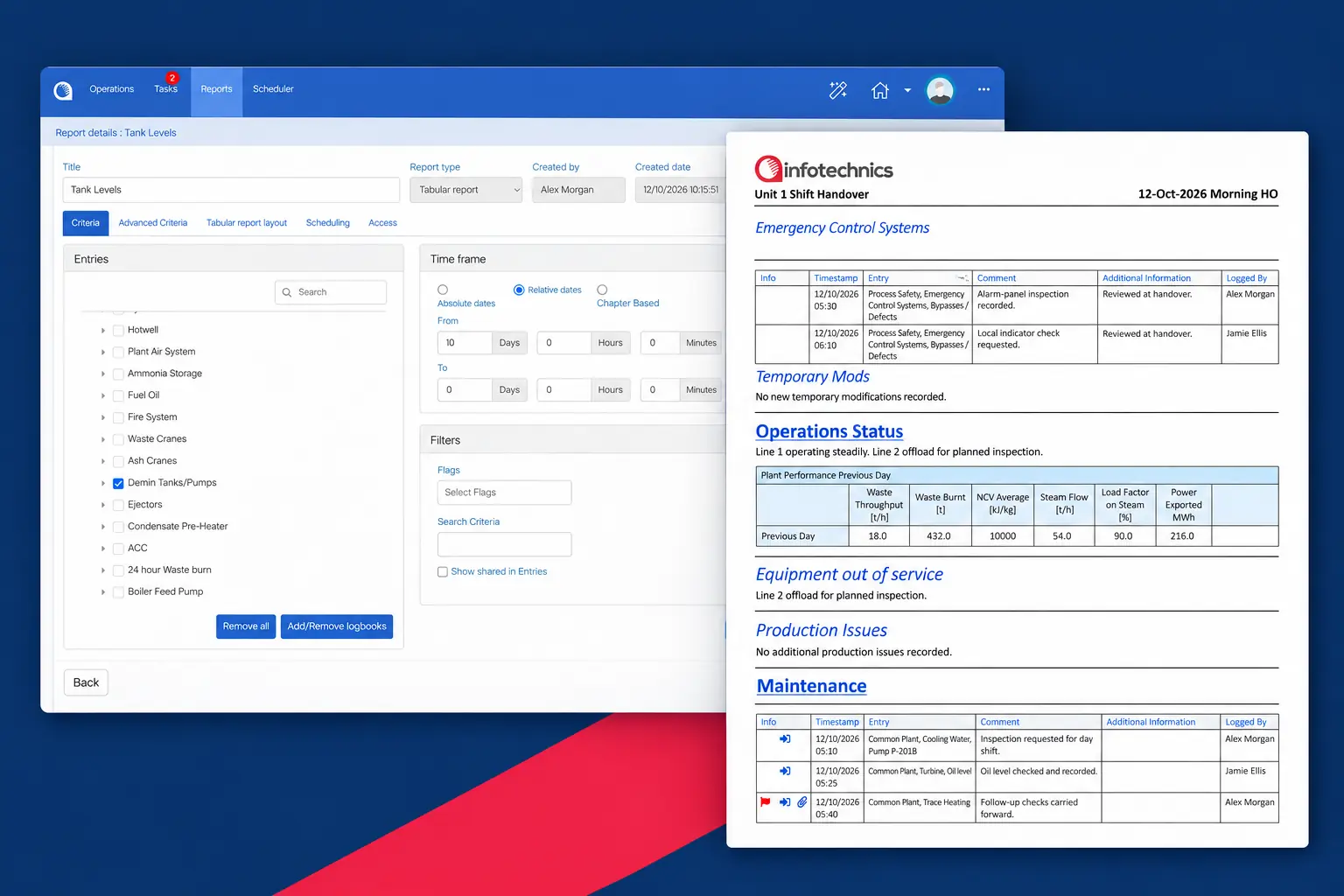
Configure the record around the information your operation needs to see.
| Information | What the team needs |
|---|---|
| Equipment availability | Equipment out of service and conditions requiring attention. |
| Readings and operating values | Values recorded by operators in configured forms, or read from PI where relevant. |
| Operating and production issues | Issues affecting the plant and the follow-up required. |
| Outstanding work | Tasks that remain open for the next shift. |
| Field observations | Findings from Mobilog rounds and inspections once synchronised with Opralog. |
The exact content and layout are configured for your site.
02 / Handover and review
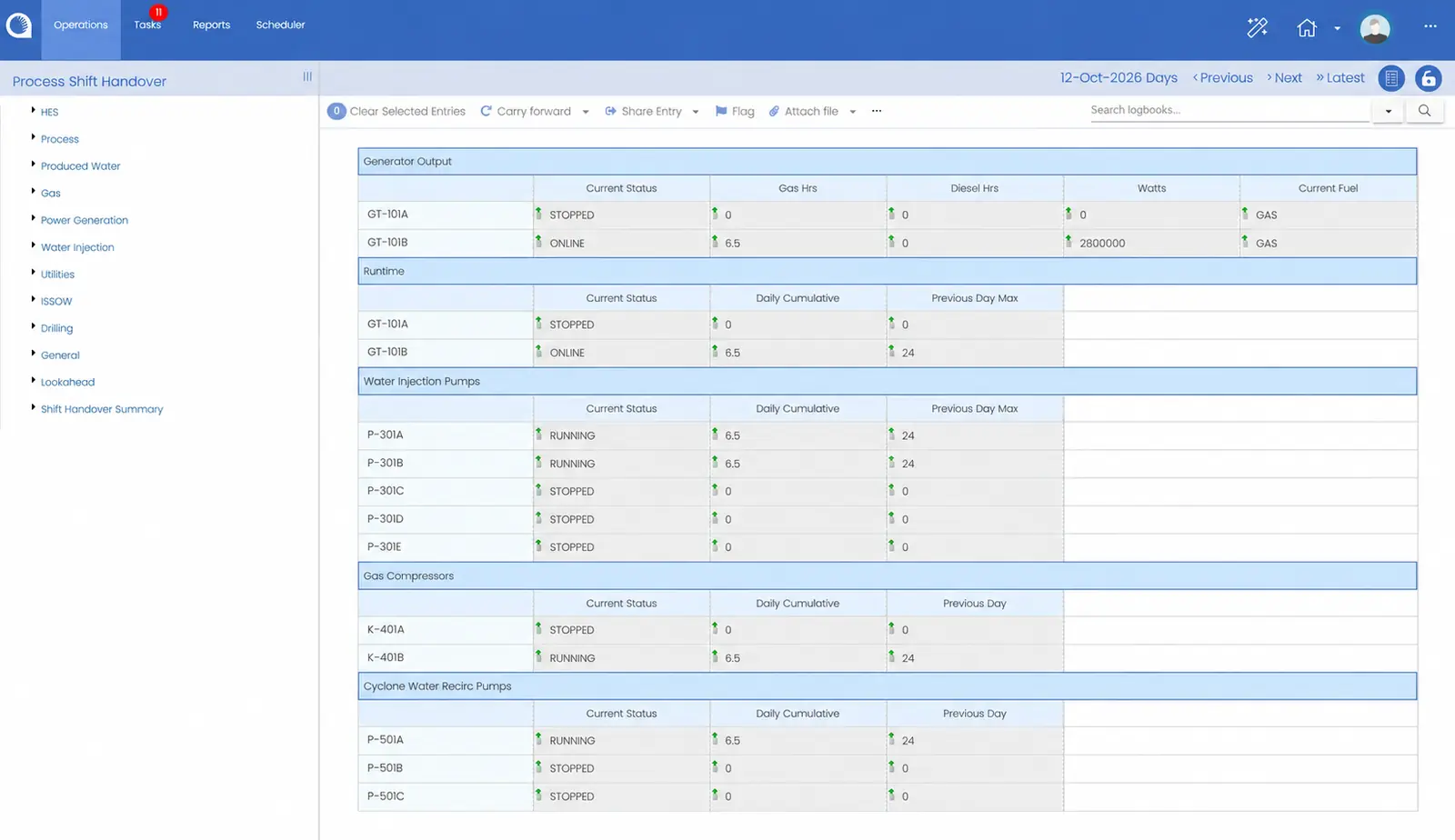
Plant status matters most when responsibility changes. The incoming team needs to know what is available, what is not and what needs attention.
Because the status information sits in the shared Opralog record, it can be reviewed at handover alongside events, instructions and outstanding work. Reporting is managed in Opralog using the same record, supporting shift summaries and daily operations meetings.
Explore shift handover software03 / Where the information comes from
Operators record status in configured logbooks and forms, with limits, warnings and colour changes where they help.
Opralog has a standard two-way PI interface: it can read data from PI, write data to PI and create log entries automatically from PI data. OPC and a generic API are also available.
With Mobilog, readings and observations from the plant join the same record after synchronisation.
04 / A practical example
Event logged
against the tag
Current status
and the comment behind it
Everything logged
against the tag
An operator logs that pump P-101 has been started, against the pump’s tag in the logbook.
That event sets the tag’s status to Running. The Plant Status screen shows the current status of every tag, with the comment that last changed it, so nobody has to update a separate list.
At handover and in reports, you can see the pump’s current status and report on everything logged against it. Scheduled reports can be emailed out, for example after a shift is signed off.
How it works on your site depends on your configuration and operating procedures.
05 / Your questions
Start with the basics. We can explore your reporting in a demonstration.
Discuss your requirements ↗Plant status reporting is how a site shares the current state of its plant: what’s running, what’s unavailable and what’s changed. In Opralog it comes from the logbooks and plant data your teams already keep, rather than a separate spreadsheet.
Equipment can be set up as tags. When an operator logs an event against a tag, such as a pump start, the tag’s status changes, for example to Running. The Plant Status screen shows the current status of every tag with the comment that last changed it.
Yes. You can report on everything logged against a tag, and graphs show how values trend over time.
Opralog can be configured around your logbooks, forms and terminology. Bring an example of how you report plant status today and we’ll show you how it would look in Opralog.
Yes. Opralog reads from and writes to PI as standard, and can create log entries from PI data automatically. OPC and an API are available too.
Which values are read, and how they are used in the record, is agreed for each project.
Yes, where Mobilog is used. Readings and observations from rounds and inspections join the Opralog record after synchronisation.
06 / See it in context
Bring an example of your current status report or handover sheet. We can demonstrate how the information could be recorded in Opralog and used at handover and in operational reviews.
Book a demo