Opralog · Digital shift handover

Shift handover software
for 24/7 industrial operations.

Give every incoming shift the information it needs to take over.

Opralog puts plant events, instructions, open tasks and field observations in one shared record, so the incoming shift knows what’s happened and what needs doing.

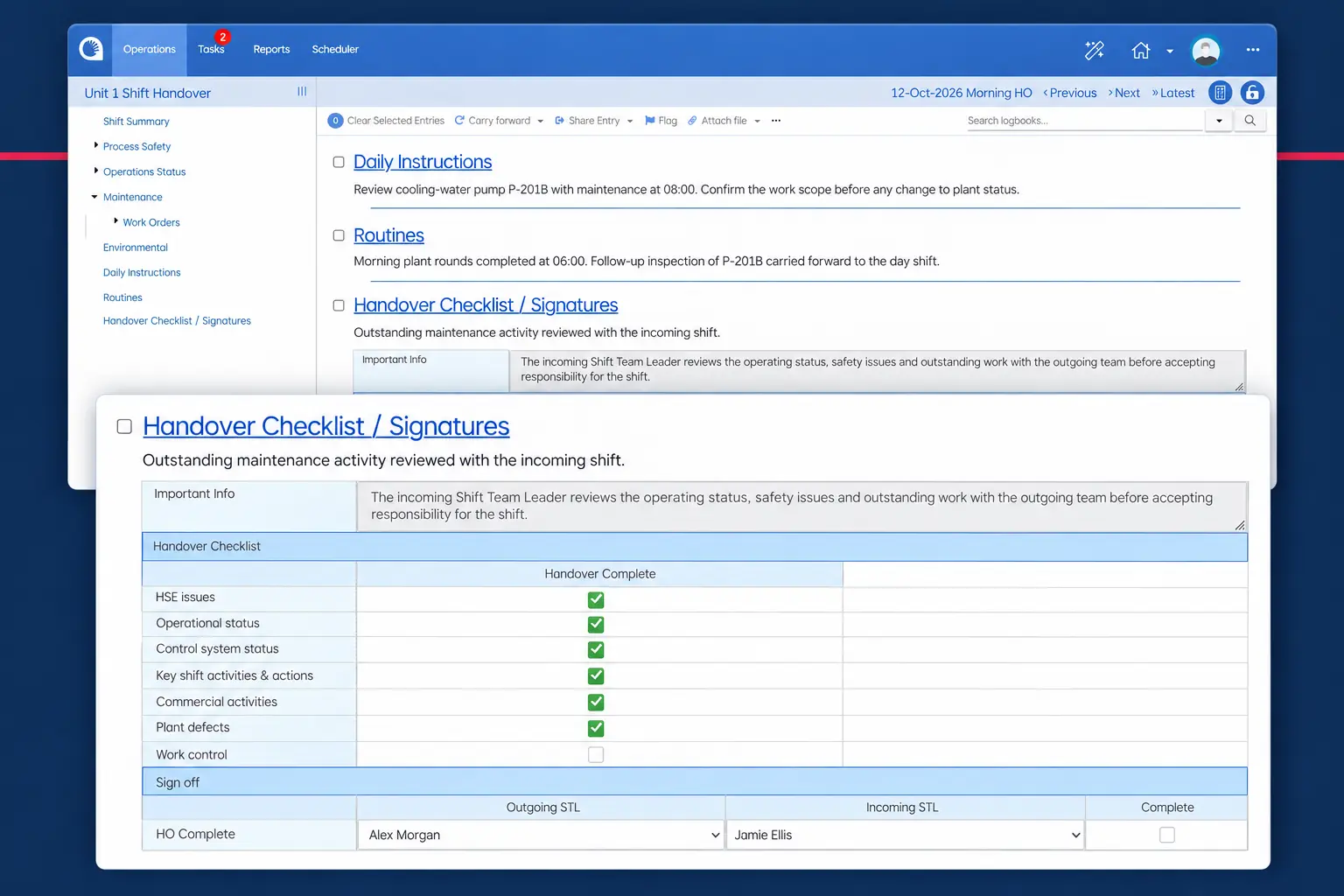
Opralog handover screen with an enlarged checklist and sign-off area.

01 / The incoming shift

A handover should explain what matters next

Which equipment is unavailable? What changed during the shift? Which instructions still apply? What needs checking, and who is following it up?

These are the questions an incoming team needs answered.

When the detail is spread across logbooks, spreadsheets, emails and separate inspection records, people spend time reconstructing the situation. A brief summary can lose the context behind an event or leave an outstanding issue unclear.

Opralog builds the handover from what your teams record during the shift. Teams can review the relevant events, instructions and open work, then refer back to the underlying record when they need more detail.

From logbook to handover

Enter once. Share what matters.

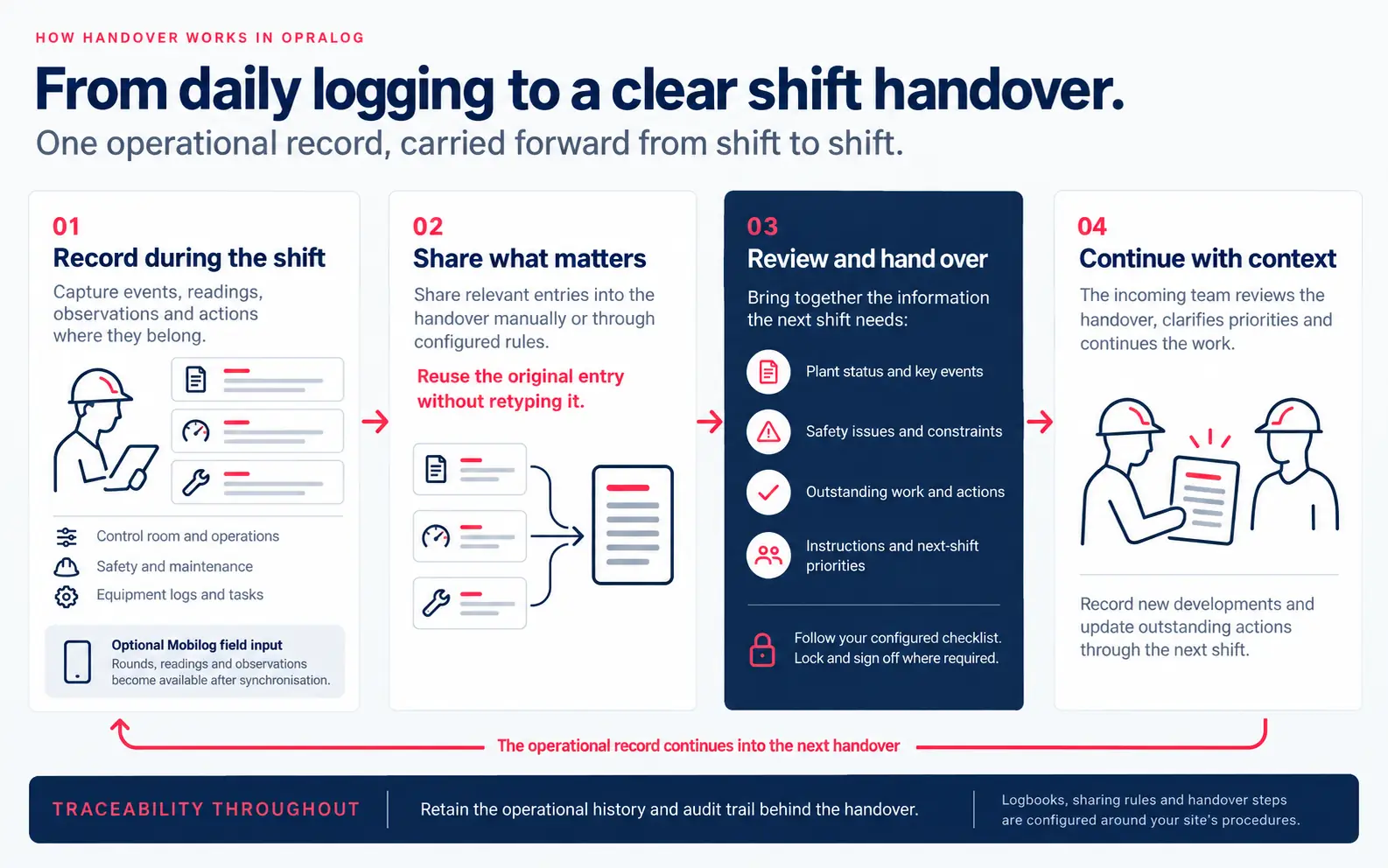
How handover works in Opralog, in four steps. 01 Record during the shift: capture events, readings, observations and actions in control room, safety, maintenance and equipment logbooks and tasks, with optional Mobilog field input. 02 Share what matters: share relevant entries into the handover manually or through configured rules, reusing the original entry without retyping it. 03 Review and hand over: bring together plant status, safety issues, outstanding work and next-shift priorities, follow the configured checklist, and lock and sign off where required. 04 Continue with context: the incoming team reviews the handover and continues the work, and the operational record carries into the next handover, with an audit trail throughout.
  1. Record during the shift: capture events, readings, observations and actions where they belong.
  2. Share what matters: share relevant entries into the handover manually or through configured rules, reusing the original entry without retyping it.
  3. Review and hand over: bring together the information the next shift needs, follow your configured checklist, and lock and sign off where required.
  4. Continue with context: the incoming team reviews the handover, clarifies priorities and continues the work.

02 / Where handovers go wrong

Where handovers tend to go wrong

Most handover problems aren’t about effort. They happen at the same few moments, and HSE guidance picks out several of them as higher risk (HSE).

01

Work that runs over a shift

Maintenance or a permit job that isn’t finished when the shift ends is one of the most common places for things to get missed.

How Opralog helps: Open work and its status sit in the handover, so the next shift can see what’s still in progress.

02

Safety systems overridden

An inhibit, override or bypass that the incoming team doesn’t know about changes how the plant will behave.

How Opralog helps: Overrides and long-term inhibits can be kept in a register that shows up at every handover.

03

Anything out of the ordinary

Start-ups, upsets and unusual running are when the next team most needs the full story.

How Opralog helps: Abnormal conditions can be flagged and carried forward until they’re resolved.

04

Said but not written down

An instruction given over the phone or in passing is easily misheard and soon forgotten.

How Opralog helps: Instructions are logged where everyone can see them, with who logged them and when.

05

Coming back after time away

Someone returning after days off has more to catch up on than a single shift’s summary.

How Opralog helps: Earlier shifts are easy to search, and open items keep the time they were first recorded.

06

Rushed at the end of a shift

When the handover is written in the last ten minutes, detail gets lost.

How Opralog helps: The handover builds during the shift as entries are shared into it, so there’s less to write at the end.

03 / Good practice

What a good handover looks like

HSE describes a good handover in three parts (HSE). Here’s how Opralog fits each one.

  1. 1

    Prepare

    The outgoing team gets the handover ready.

    In Opralog, most of it is already there: entries shared into the handover during the shift, open work and anything carried forward.

  2. 2

    Talk it through

    Outgoing and incoming staff go through it together, face to face, and ask questions.

    Everyone talks from the same record on screen, so nothing depends on memory.

  3. 3

    Check and accept

    The incoming team checks what they’ve been told before taking over.

    The shift can be locked and signed off, with names recorded, and if you want, the next shift can be held until it has accepted the handover.

04 / Before you hand over

A simple handover checklist

Whatever system you use, these are the things the next shift needs to know. In Opralog, you can build your own version into the handover, so it’s followed the same way every time.

  • The plant’s current status, and anything unavailable or out of service.
  • Work in progress, including permits that are still open or suspended.
  • Overrides, inhibits and bypasses currently in place.
  • Abnormal conditions, recent alarms and anything being watched.
  • Instructions and standing orders for the next shift.
  • Open tasks, who owns them and when they’re due.
  • What the incoming team should check first.

05 / The handover record

What can your shift handover cover?

Configure the record around the information your operation needs to transfer.

InformationWhat the next shift needs
Plant events and operating changesWhat happened, what changed and the operational context.
Equipment condition and availabilityRecorded defects, unavailable equipment and conditions requiring attention.
Daily instructions and standing ordersInstructions relevant to the current operation and the next shift.
Operational registersSite-specific records maintained in configurable register-type logbooks.
Outstanding tasks and issuesWork that remains open and the follow-up required.
Field readings and observationsFindings from Mobilog rounds and inspections once synchronised with Opralog.
Shift reports and operational reviewsInformation needed for shift summaries and daily operations meetings.

The exact content and process are configured for your site.

06 / Continuity across shifts

Connect the work before, during and after handover

01

During the shift: capture the context

Record operational events, observations and decisions as work happens. Keep instructions and relevant tasks within the same system, rather than assembling the handover from several disconnected sources at the end of the shift.

02

At handover: review the operational picture

Use the shared record to support the discussion between outgoing and incoming teams. Focus on changes, abnormal conditions, instructions and outstanding work. Refer back to earlier entries where the next team needs more context.

03

Into the next shift: continue the follow-up

Keep information available after the briefing. The incoming team can consult the operational history, add further observations and continue the work recorded in Opralog.

Your site’s procedures determine how people review the information and transfer operational responsibility. Shifts can be locked and signed off if needed.

07 / Configured for your site

Configure Opralog around your handover process

A network control centre, power station and refinery have different operating priorities. Their handovers should reflect those differences.

Opralog can be configured around your logbooks, forms, registers, terminology and workflows. Relevant configuration can include:

  • Fields for the information your teams need to capture.
  • Conditional visibility to show the appropriate parts of a form.
  • Limits, pop-up warnings and colour changes.
  • Scheduled or assigned entries and tasks.
  • Notifications or tasks triggered by a recorded condition.

This lets you connect the information captured during the shift with the process your teams use to review and act on it.

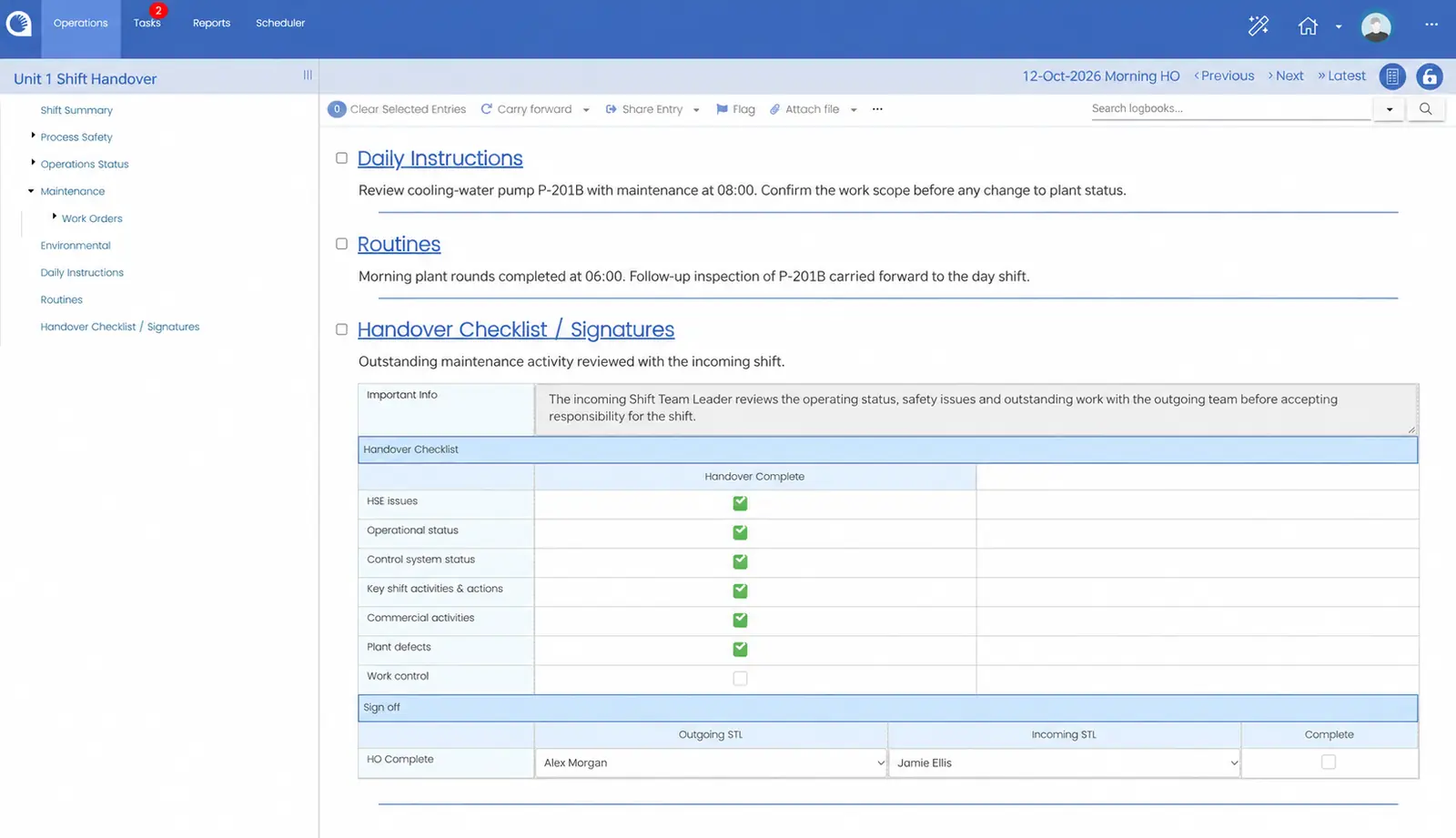
Opralog handover checklist with outstanding work-control review and incoming and outgoing team-leader fields.
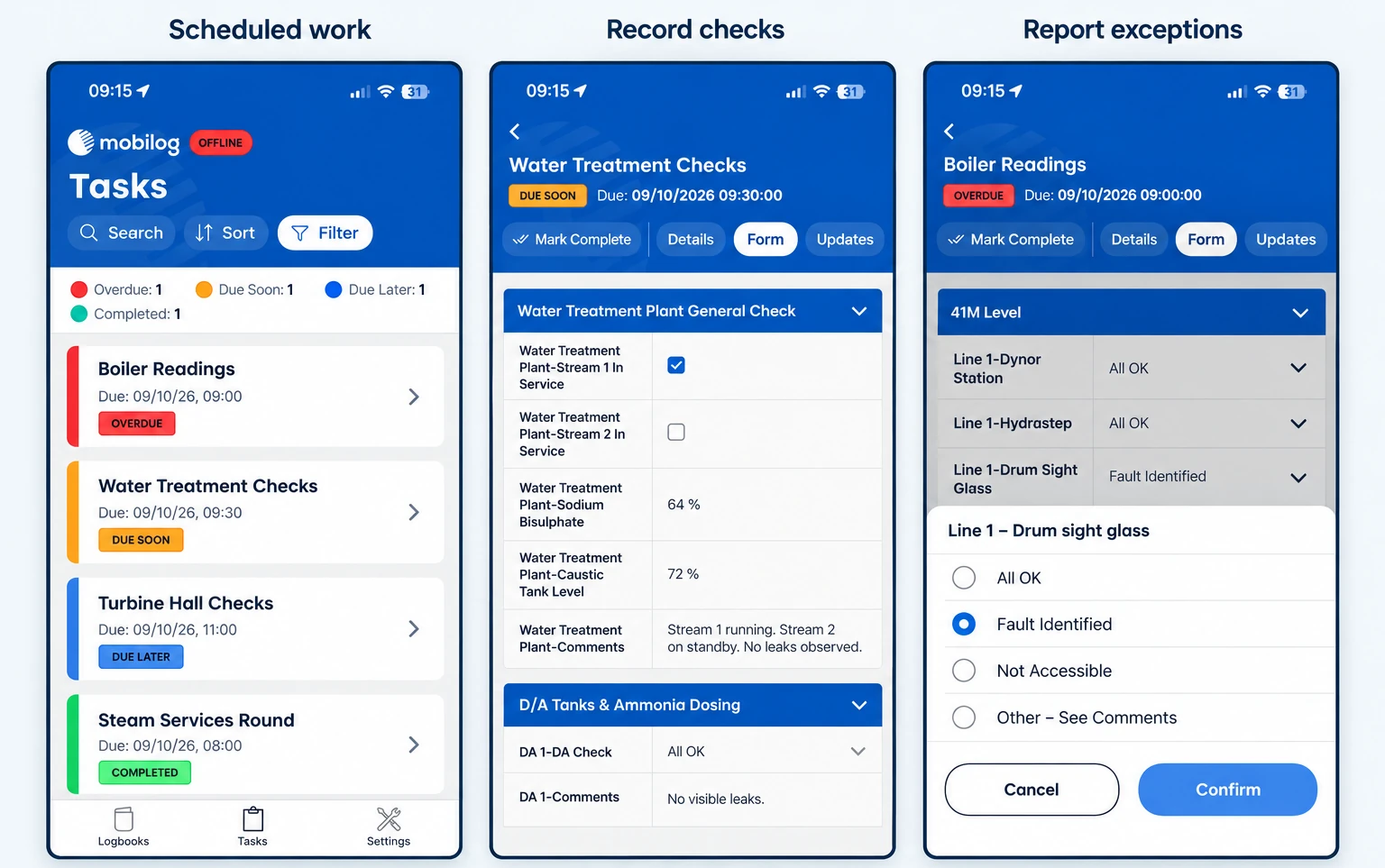
Three Mobilog screens: a task list showing overdue, due soon and due later work while offline; a water treatment check form; and a boiler readings form with a Fault Identified option selected

08 / Control room + field

Bring the field into the handover

Important information does not always originate in the control room. A reading, inspection finding or defect identified during a plant round may change what the next shift needs to know.

Mobilog extends Opralog Web into the field. Operators can capture readings, comments and photographs, identify equipment by RFID tag or barcode, and view downloaded historic readings.

Forms and processes are configured in Opralog and used through Mobilog. After synchronisation, field information is available in the same operational record used by control-room and shift teams.

Mobilog is an optional, separately licensed app for iOS and Android that requires Opralog Web. It supports offline capture; shared updates and server-side notifications require connectivity and synchronisation.

Explore mobile operator rounds

09 / A practical example

Follow one observation through to the next shift

01 / FIELD

Pump P-204

78 °C

Unexpected reading
Comment and photo recorded

02 / SYNCHRONISE

Opralog record

Follow-up

Configured notification
or task created

03 / HANDOVER

Incoming shift

Context

Original observation
and outstanding work

An operator finds an unexpected pump temperature during a round. They record the reading in Mobilog and add a photograph and comment.

Once the record is synchronised, the information is available in Opralog. A configured trigger can create a notification or task for follow-up.

At handover, the incoming team can review the observation, its context and the outstanding work. The next shift starts with access to the record behind the issue.

The response depends on your configuration and operating procedures.

10 / Industrial operations

Built for industrial teams working across shifts

Infotechnics focuses on power generation, electricity transmission and distribution, and upstream and downstream oil and gas.

Opralog is also configurable for chemical operations, process manufacturing and other industrial environments where operating information needs to remain available across shifts.

The common requirement is continuity: a dependable record of events, conditions and work that remains useful when the people on shift change.

11 / Your questions

Questions to ask when evaluating shift handover software

Practical questions about the software, deployment and getting started.

Discuss your requirements ↗
01

What is shift handover software?

Shift handover software replaces the paper or spreadsheet handover with a structured electronic record. In Opralog, the handover is built from what your teams record during the shift, so the incoming shift sees what happened, what’s still open and what needs action.

02

How is Opralog different from a spreadsheet or shared handover document?

A spreadsheet or shared document can hold a shift summary. Opralog connects that summary with operational logging, configurable registers, tasks, notifications and reporting.

The useful comparison is how information moves through your operation: where it is recorded, who needs it, how an exception is followed up and what the next shift can see. A demonstration should show that complete process.

03

Can Opralog reflect our existing handover forms and procedures?

Opralog can be configured around your forms, terminology, logbooks and operational workflows. That can include conditional fields, limits, warnings and configured responses.

A handover process can be configured in Opralog, and shifts can be locked and signed off if needed. Bring a current handover and tell us what your incoming teams need. We’ll show you how Opralog handles it.

04

How are outstanding issues and abnormal conditions followed up?

Opralog supports tasks and configurable notifications. A recorded condition can trigger follow-up, for example when an operator reports a defect or enters a reading outside an expected limit.

The response depends on the configuration. During evaluation, follow an example from its original entry through to the task or notification and the next shift’s review.

05

Do we need Mobilog to use Opralog for shift handover?

No. Opralog is the core operational logging and shift handover system.

Add Mobilog when you want operators to record rounds, inspections and observations on mobile devices. Mobilog is separately licensed and requires Opralog Web; it is not a standalone inspection system.

06

Can information from plant systems be included?

Yes. Opralog has a standard two-way PI interface: it can read data from PI, write data to PI and create log entries automatically from PI data. OPC and a generic API are also available.

The useful starting point is the information you want to bring into the record and how operators will use it. Opralog’s generic interface and APIs let any external system connect, such as a maintenance system. We agree what’s connected for each project, including data direction, access and implementation work.

07

Where is Opralog deployed, and who controls the infrastructure?

Opralog is installed on your own servers or in your own private Azure or AWS environment. Infotechnics does not host it, and it is not supplied as SaaS.

We’ll agree the set-up, access and security with your IT or OT team early on, and who looks after what.

08

Can we find and review information from previous shifts?

Opralog provides a searchable operational record so teams can return to earlier events and observations. That history can support handover preparation, operational reviews and investigation of recurring issues.

Opralog keeps a full audit trail of everything that is done. If you have specific audit requirements, include them in the evaluation so the required history, access and reporting behaviour can be demonstrated.

09

What is involved in moving from paper logs or spreadsheets?

Begin by agreeing which records and workflows you want to bring into Opralog. Review the information captured, who uses it and how outstanding work is followed up.

The implementation scope should cover configuration, deployment, user training and any integration or historic-data requirements. How long it takes depends on what’s included and how ready you are. We’ll agree a timeline with you rather than guess at one.

10

How much does Opralog cost?

It depends on what you need: Opralog licences, Mobilog if you want it, configuration, set-up, integrations, training and support. Tell us how you work today and what you’d like to cover, and we’ll put a quote together.

11

Does digital shift handover replace the briefing between teams?

No. People still talk at handover. Opralog makes sure everyone has the facts in front of them before, during and after.

12

What should a good shift handover include?

As a starting point: plant status, work in progress and open permits, overrides and inhibits, abnormal conditions, instructions for the next shift and open tasks. The checklist above sets this out. In Opralog, your handover can follow a checklist like this every time.

13

Is shift handover covered by health and safety guidance?

Yes. In the UK, the Health and Safety Executive treats shift handover as a safety-critical communication and sets out principles for doing it well, such as preparing in advance, handing over face to face and backing up what’s said with a written record. Your own procedures decide how handover works on your site; Opralog gives those procedures a clear written record to work from.

14

Can supervisors and day staff see the handover?

Yes. Opralog is web-based, so anyone with access can open the handover and earlier shifts in a browser. Access is set by role, so people see and change what they should.

12 / See it in context

See your handover process in Opralog

Bring a current shift log, handover form or example of an issue that continued across several shifts.

We can focus the demonstration on how the information is recorded, what the incoming team needs to see and how follow-up is managed. If field observations are part of the process, we can include Mobilog.

Book a demo