Operator rounds checklist template

A round sheet that comes back with “all OK” ticked down the page tells you the round was walked. It doesn’t tell you a bearing sounded rough, or that a reading at 03:00 has crept up since last week. This template is built around the bits that matter after the round: what was checked, what was found, who’s been told and what still needs attention.

Use this free operator rounds checklist to plan a route, record readings and observations, and keep track of findings that need follow-up. Adapt the checks and approved limits to your equipment and site procedures.

Free to download. No sign-up. PDF, 4 pages (273 KB), and Excel (47 KB).

The PDF is ready to print. Use the Excel version to build a checklist for your own route.

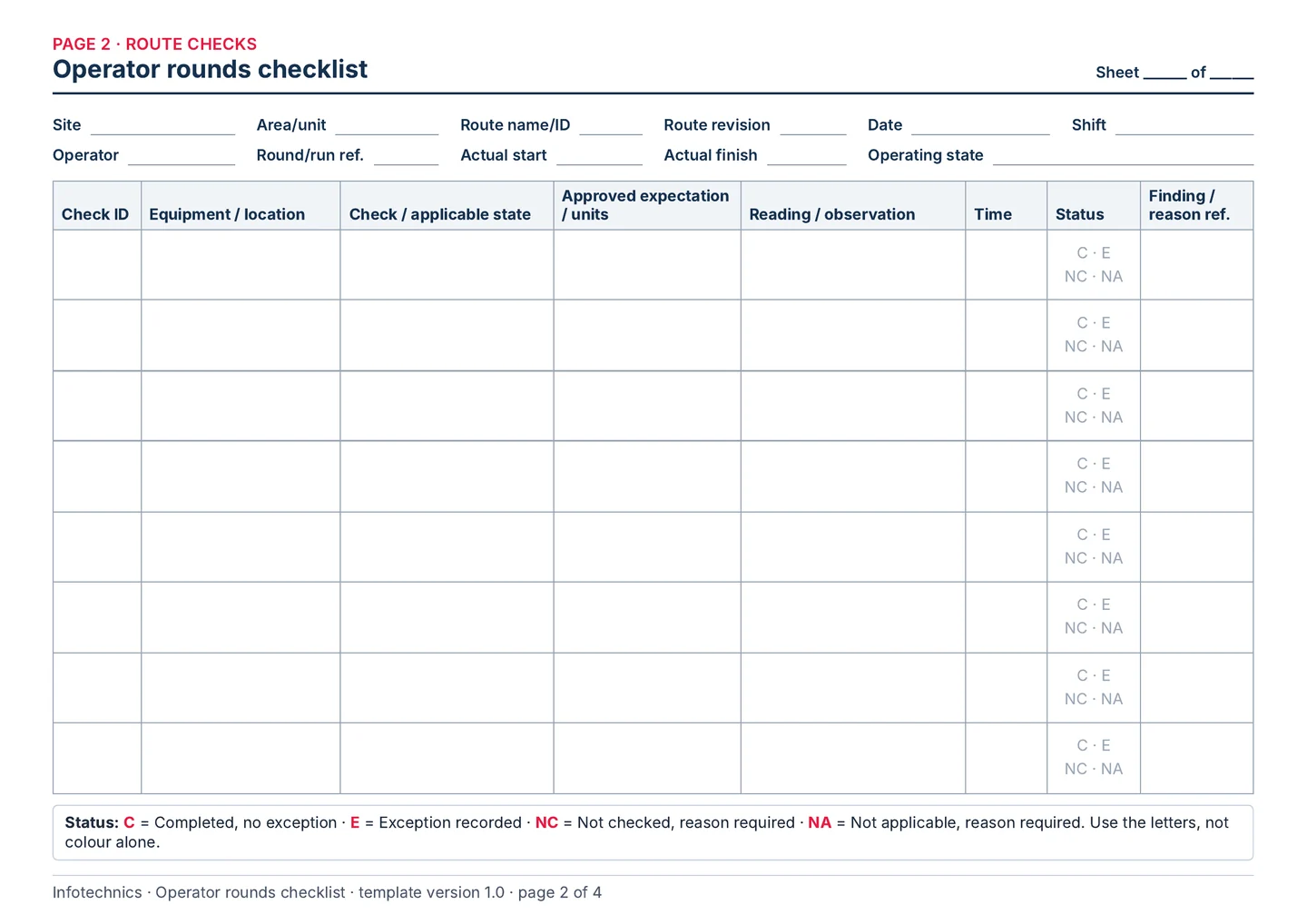
Operator rounds checklist with fields for equipment, checks, readings, status and finding references
Route checks, findings and follow-up in one template.

01 / How to use it

How to use the operator rounds checklist

1Set up the route.

List the equipment in the order operators will walk it. Give each check a clear description and say when it applies, including any differences between running, standby and shutdown conditions.

2Add approved limits and expected conditions.

Use your site’s procedures and equipment guidance to define the expected result, units and what to do if something’s out of range. The person reading a gauge at 03:00 shouldn’t have to remember what normal looks like. Have the route reviewed by someone with the relevant knowledge and authority before it’s used.

3Record what you find.

Enter the actual reading or observation and the time checked. Mark exceptions clearly. If a check can’t be completed, record why. Leave space for observations that aren’t on the planned route.

4Review the findings and hand over open work.

Before the end of the shift, account for incomplete checks and outstanding actions. Make sure the relevant people have the information they need, and include anything important to the incoming shift in the handover.

Urgent findings should be reported straight away. Follow your site’s escalation procedure. Don’t wait until the round is complete, and don’t rely on the completed sheet being reviewed later.

This is a starting template for routine rounds. Adapt and approve it for your site. It doesn’t replace operating procedures, risk assessments or required specialist inspections.

02 / The template

What’s on the template

Round details

Site and area, route name and revision, date, shift, operator, start time and finish time.

Before you go out

  • Review the handover and relevant logbook entries for changes affecting the route, including equipment out of service, isolations, overrides and temporary instructions.
  • Check for unavailable equipment, restrictions, isolations, permits and work taking place nearby.
  • Confirm the required PPE, communication equipment (including a radio) and any other equipment specified for the route, such as a gas detector or a device approved for the zones you’ll walk through.
  • Know how to raise an urgent finding. Where lone-working arrangements apply, confirm the check-in and return arrangements.

On the route

Use one row for each check. Record the equipment, check, approved expectation, actual result, time and status. Link any exception or incomplete check to its follow-up record.

Use a clear status for every row:

  • CCompleted, no exception.
  • EException recorded.
  • NCNot checked, reason required.
  • NANot applicable, reason required.

A blank row shouldn’t leave the next person guessing. If equipment can’t be reached or a check can’t be completed safely, record the reason and agree the next step under your site’s procedure.

Changes to notice along the route

From a safe position, record relevant changes you notice, including weeps and drips that weren’t there last round, rough bearings or unusual vibration, hot spots, unusual smells near drains, damaged lagging, and blocked access. Never approach a suspected release or touch equipment to investigate a possible problem. Follow your site’s procedure.

Findings and follow-up

Use the findings section for both exceptions to planned checks and unexpected observations. Record what was found, action taken, who was informed and when, who’s following up, and when the next update is due.

After the round

  • Account for each check, including anything not completed.
  • Confirm that urgent findings have already been reported.
  • Give outstanding work a responsible person or team and a next action.
  • Include relevant findings and incomplete checks in the shift handover.
  • Complete the review and filing steps required by your site.

Our shift handover checklist covers what the incoming team needs to know.

Free to download. No sign-up.

“It’s much easier to see which checks have been completed and what still needs attention. That’s useful during the shift and when we’re asked to show the records afterwards.”

Operations Team Leader, chemical manufacturing site

03 / Digital rounds

When you need more than a paper checklist

A paper checklist can give a round structure. It struggles with what comes after: the sheet typed up late, the reading nobody compared with last week, the missed round that doesn’t show up anywhere. That’s the job paperless operator rounds are for.

Digital rounds also help operators identify equipment, follow the relevant checks and get findings to the people who need to act.

Identify the equipment

Barcode, QR and NFC or RFID tags help operators identify the equipment they’re checking and reduce manual searching or typing. Scanning helps confirm the equipment being referenced. It doesn’t, on its own, prove the inspection was completed.

Record planned checks and unexpected findings

Mobilog supports structured tasks and ad hoc logbook entries. Operators can work through an assigned round and record an unexpected observation without waiting for it to appear on a checklist.

Ask the relevant questions

Forms configured in Opralog can respond to an operator’s answers. If equipment is stopped, the form can show the relevant standby checks. If a possible issue is reported, it can ask for further details. Limits configured in Opralog can flag an out-of-range reading right at the equipment.

Follow up the exception

Configured rules can trigger notifications or tasks for supervisors or maintenance teams. Relevant entries can also be shared into shift handover. Where a suitable maintenance-system integration is configured, a defect can initiate a work-order request.

Mobilog works on iOS and Android. Entries are shared with Opralog automatically when a network connection is available, or kept on the device until it reconnects. Urgent issues still need to be reported through the site’s agreed communication procedure. Findings land in Opralog logbooks: one searchable record across your teams, shifts and sites, such as the control room, maintenance and the lab.

Explore operator rounds with Mobilog

“Issues found during rounds are easier to follow up because the readings, comments and photos are together in Opralog. There’s less chasing around to find out what happened.”

Production Supervisor, offshore oil and gas platform

04 / Going digital

Run the same checklist in Opralog

You can build your own version of this checklist as a Mobilog round, with the findings landing in Opralog. Mobilog is licensed separately and used with Opralog, online or offline. Opralog is installed on your own servers or in your organisation’s private Azure or AWS environment.

Bring your own round sheet and we’ll show you how it runs in Opralog and Mobilog.

05 / Questions

Questions about operator rounds checklists

01

What should an operator rounds checklist include?

Include the route and equipment, in the order it’s walked, the checks to carry out, approved limits or expected conditions, and space for actual readings or observations. Record the time and status of each check, plus any finding, action or reason a check couldn’t be completed. Include round details so the record can be traced to the route, date and operator.

02

How do we adapt the template to our plant?

Start with your equipment, operating procedures and the information your teams need. Remove example checks that don’t apply, add the checks your route requires, and enter the approved limits, units and escalation instructions. Account for different operating states. Have the completed route reviewed and approved through your site’s process before use.

03

How often should operator rounds be completed?

There’s no single interval that suits every plant or item of equipment. Set the schedule using your site’s operating requirements, risk assessment, equipment guidance and experience. Some checks may be needed each shift, while others follow a different schedule or apply only in particular conditions. Review the route when equipment or operating conditions change.

04

What should an operator do if a check can’t be completed?

Record it as “Not checked”, explain why and follow the site’s procedure for reporting or arranging the next step. Don’t leave the result blank or mark it complete. Use “Not applicable” only where the check genuinely doesn’t apply under the approved route instructions.

05

How should abnormal readings and defects be followed up?

Record the equipment, finding, time and any action taken. Report urgent issues immediately using the agreed procedure. For outstanding work, identify who’s following up and when an update is needed, with a reference to the relevant task or maintenance record where available. Make the information available to the next shift.

06

What’s the difference between a rounds checklist and a shift handover checklist?

A rounds checklist guides checks on the plant and records what the operator finds. A shift handover checklist is for outgoing and incoming teams to review the information needed to take over, including relevant findings from rounds, equipment status and unfinished work. They serve different purposes, but the information should connect.

07

Is there an operator rounds template I can download?

Yes. This one is a free PDF and Excel workbook, with no sign-up.

08

When is a paper or spreadsheet rounds checklist no longer enough?

When sheets get typed up late, readings aren’t compared with last week, or a missed round doesn’t show up anywhere. That’s when it’s worth looking at an app such as Mobilog.

Further guidance

The following sources informed the inspection and lone-working points. They support the need to tailor checks and communication arrangements. They don’t approve this template or prescribe a universal operator-rounds schedule.